Scheduling for dermatology practices, built by a dermatologist.
Providers, MAs, rooms and sites on one live week.Coverage when someone calls out, without the morning of texts.Each person's day on their phone.
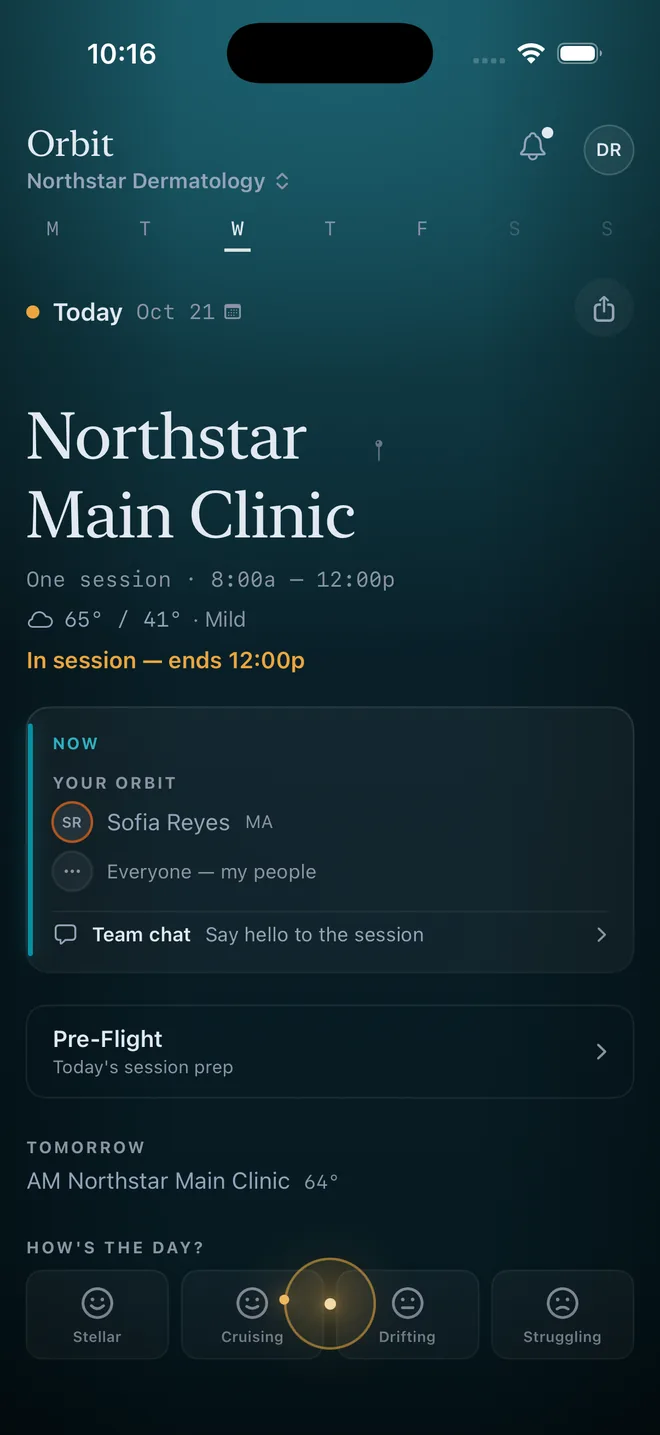
Real screenshot · Orbit for iPhone and Android · demo practice
See the manager's view →

The whole practice on one page: each provider's card with their MAs, the front desk, and who is still free.
Derm scheduling has its own shape.
A dermatology practice schedules a provider and the team around them: the MAs, the rooms, the site.Mohs days, cosmetic days and clinic days each need a different team.General shift tools don't see any of that.
Your usual week, placed exactly
Who works which days, at which site, with which MAs.Say it once and every week drafts from it; you change only what's different this week.
The team around each provider
Name what fully staffed means for each provider's pod.The week shows which days are fully staffed and which are short, before anyone walks in.
Call-outs handled by text
Someone taps "Can't make it."Orbit asks the right person by text, checked against time off and what's already placed.YES is the whole reply.
Everyone's day on their phone
Where to be, who they're with, when to leave.Time off, swaps and call-outs are one tap on the day, and go to whoever decides.
Monday to Friday, without the morning of texts.
The week is drafted
Next week drafts itself from your usual week.The manager reviews it, moves the two things that changed, and launches.Everyone's phone updates.
An MA calls out at 6:40
She taps "Can't make it."Orbit asks the MA who can cover, by text; she replies YES and the day is whole again.The manager sees the receipt, not the scramble.
Time off and swaps are decided
Every ask of the week waits in one Decisions inbox for the person who can approve it.The obvious ones Orbit handles; the rest take a tap.
You talk to it. It works the week with you.
The manager asks HAL to draft the week, find cover, or explain why a day reads short.Staff ask where they're working tomorrow, who's with them, or where they can pick up a half day.
- Asks before changing anything
- Shows its work — sources and memories, cited
- Flags a problem before the week goes out
The one thing to flag: Dr. Raghavan's slot is at the Mohs Surgery Suite, while Dr. Fontaine's entire week is currently at the dermatology clinic. You'd want to confirm Dr. Fontaine has Mohs credentials before moving them over. If that checks out, there are no scheduling conflicts on the Monday AM side.
Want me to check conflicts formally and stage the move?
Every feature in Orbit exists because I got tired of doing it in a spreadsheet.If it's in here, it solves a problem I've had scheduling dermatology clinics.
I run a multi-site dermatology department, and I schedule it.Existing tools are built for hospital call schedules or general shift work.None of them understood a Mohs day, the MA team around a provider, or a clinic across four sites.
From spreadsheet to live schedule in a week.
Send what you keep today
A spreadsheet, a PDF, or your roster.We set up your sites, people and usual week with you before your team sees it.
Draft and launch your first week
The week drafts from your usual pattern in seconds; you review, change what's different, and launch.Your team joins with a code and sees their own day in the browser or the app.
More turns on as you settle in
Coverage when someone calls out, then swaps and pickups.
Questions practice managers actually ask.
What does Orbit schedule?
Providers, MAs, front desk and rooms across your sites, one week at a time.Time off, swaps and call-outs run through the same schedule, so the week stays true.
How does it handle our MAs?
Each provider has a team, and you tell Orbit what fully staffed means for it.The draft places the usual MAs with each provider, and the week shows any day that reads short.When an MA calls out, Orbit asks the MA who can cover, by text.
What about Mohs days and cosmetic days?
They're part of your usual week: a surgeon's Mohs day at the surgery suite with its own team, a cosmetic day with a different one.Orbit places the pattern exactly and only asks you about what changed.
How is this different from Amion, Lightning Bolt, or QGenda?
Those are built mainly for call and shift schedules run by a central scheduler.Orbit is run by the practice itself, set up with you in the first week, and puts each person's day on their phone.The comparison page has the detail.
Does Orbit connect to our EMR?
No. Your EMR keeps the patient schedule; Orbit keeps the staff schedule: who works where, with whom, and when.Orbit stores no patient information.When a decision in Orbit changes when a provider is in clinic (approved time off, a closed office, new hours), Orbit can draft the request for whoever changes that provider's template in your EMR.It opens in your own email and you send it. This is off until you turn it on.
We also run a residency program. Does Orbit cover that?
Yes, on the same schedule.Duty hours, continuity clinic and training exposure are on the academic medicine page.
What does it cost?
One price per practice or program.New practices and programs start with a 90-day pilot at $250 a month, set up with you.After the pilot, the price is set with you. Providers, MAs and front desk all sign in free.Full details on the pricing page.
See it on your practice.
Tell us about your practice or program and we'll set up a 30-minute walkthrough on how you actually schedule.No generic product tour — a working session on the problems you're trying to solve.
Three pages, one platform.
Orbit for Healthcare
What every practice gets: the week, the phone, coverage, time off and approvals.
The 90-day pilot
$250 a month, set up with you.Everyone signs in free.The price after the pilot is set with you.
Dermatology
Providers, MAs, rooms and sites for the practice, built by a dermatologist.
Put your practice on Orbit.
Start with a 90-day pilot.We set your practice up with you.
Already have an account? Sign in