Your whole team,
one schedule

Replace the spreadsheet your entire clinic depends on. Build a week in minutes. Your team sees it the moment you hit launch.

Get Started Free →
Already have an account? Sign in
Built by a physician · Works on desktop & mobile · No downloads required
Open your phone.
Know your day.

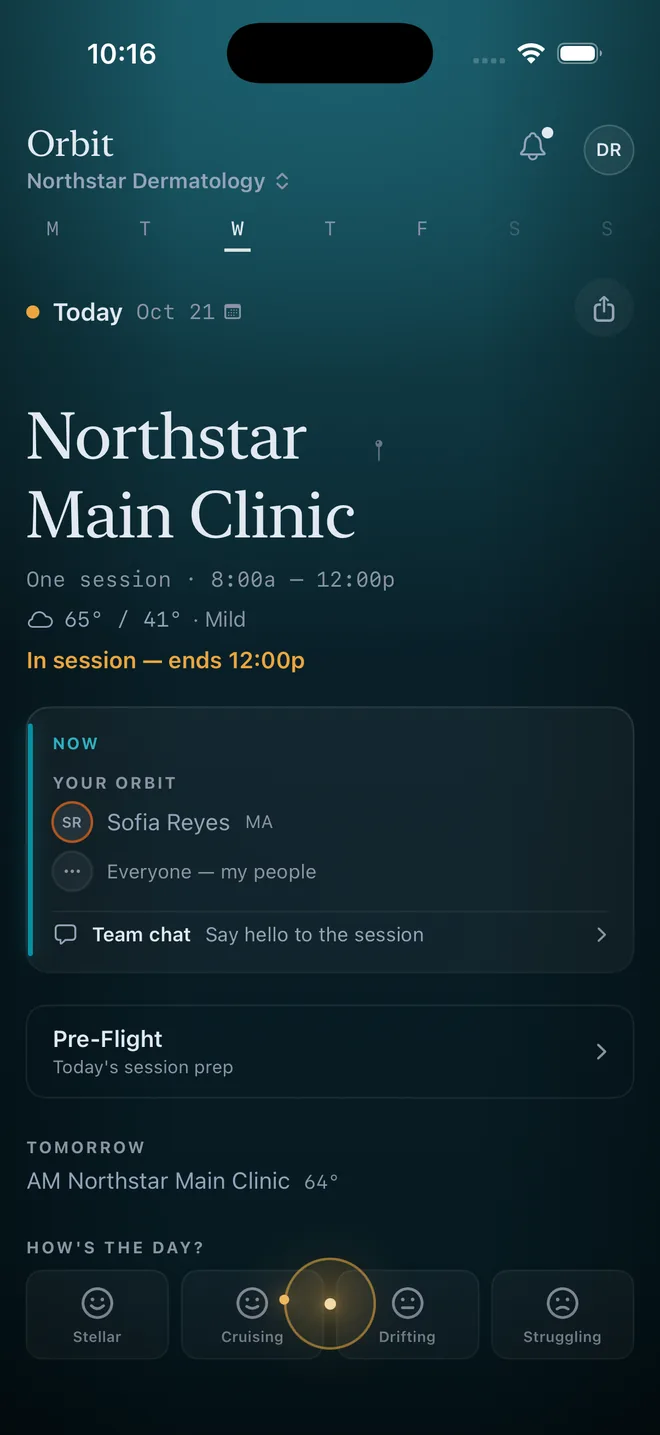
Everyone on your team gets a personal card showing where they're working, who they're with, and what's changed — before they walk in the door.

📍

Your day at a glance

Location, room, shift time — everything you need in one card.

👥

See your team

Know who you're working with. Tap to call or text.

🔄

Request swaps instantly

"Can't make it" and "Request swap" built right in. Coverage happens fast.

💬

Team chat

Group messaging and direct messages, one tap away.

× Close
⇧ Share
Schedule
Patients
Monday April 6
West
Clinic
🌧 52°/38°
~18 min
Your Orbit Comms
A
Alvarez
Resident
P
Patel
Resident
O
Okafor
MA
Daily Question & Check-in
✎ Private Note
Clinic in 14h Set scheduling preferences
You build the week.
Your team lives it.

Most scheduling tools serve the coordinator or the staff — never both. Orbit gives each role a fundamentally different experience from the same data, connected by a feedback loop that compounds over time.

The Coordinator

Build

Assign attendings, residents, and MAs to rooms, sessions, and sites across the week. AI auto-generate, drag-and-drop, credential validation, ACGME compliance checks, and real-time fairness scoring.

Grid + Board views, always in sync
AI fills gaps with 10+ constraint types
ACGME compliance validated before launch
Cross-schedule conflict detection

Your Team

Live

Each provider and resident sees a personalized daily card — not a read-only copy of the grid. Their assignment is enriched with contextual intelligence that doesn't exist in the coordinator's view.

Site prep tips for unfamiliar clinics
Teammates flagged as new or familiar
"Ask HAL why" — AI fairness explanation
"Where can I pick up a half day?" — AI finds open slots ranked by fit
Credential tracking and training exposure
The Loop That Makes It Smarter

Every action your team takes — rating a session, requesting a swap, setting preferences, attesting duty hours — flows back into the AI scheduling engine. Swap patterns reveal which slots don't work. Feedback flags sites that need attention. Preferences become constraints the AI respects. The more your team uses it, the better the schedule gets.

Built for healthcare

Orbit is purpose-built for clinics and academic medical centers. AI scheduling that respects credentials, compliance rules, and team preferences.

AI Auto-Generate

Create a full week in one click. Respects user preferences, blocks, and skill constraints. Preview before launching.

Fairness & Equity

Track assignments by role, site, and session. See imbalances in real time with fairness scores. Stay compliant and reduce burnout.

🛡

Compliance & Alerts

Auto-detect scheduling conflicts, double-bookings, and credential gaps. ACGME rules, shift limits, and custom constraints.

💬

Swaps & Coverage

Shift swap marketplace with approval workflow. Someone calls out? Mayday finds the best replacement in seconds — ranked by availability, fairness, credentials, and skills.

📊

Multi-Site Roster

One unified roster across all clinics. Cross-site conflict detection, staffing heatmaps, and department-to-department staff loans — all in real time.

🤝

Team Engagement

Peer kudos, post-session feedback, site check-ins, and onboarding checklists. Staff rate sessions — the AI learns and adjusts next week. A closed loop that builds trust.

Real-Time Sync

Every change syncs instantly across your team. Desktop, mobile, web — all devices see updates in real time. No more confusion.

📈

Ops Deck

Utilization dashboard for department chairs — room fill rate, revenue gaps from empty slots, site health cards, and chronic pattern detection across 12 weeks of history.

🧬

Program DNA

July handoff toolkit for chief residents. Outgoing chiefs document scheduling rules, pairing constraints, tribal knowledge, and patterns so incoming chiefs don't start from scratch.

🎓

Role-Aware Session Prep

AI-generated pre-session content for every role: residents get clinical refreshers and training gap recovery, MAs get room setup protocols, rotators get site orientation — all from a single Prep tap.

HAL — Your Scheduling AI

HAL is Orbit's conversational AI — available to both schedulers and staff. Not a constraint solver you configure once. A collaborator you talk to every week.

📋

Schedule Builder & Validator

Auto-generate full weeks or fill gaps. Validates against ACGME rules, credentials, pairing rules, and cross-schedule conflicts before launch. Repair loop catches violations automatically.

🔍

Coverage & Availability

Find open slots, locate available staff by role, run Mayday replacement ranking when someone calls out. Checks skills, credentials, pairing rules, and fairness in one query.

Fairness & Burnout

"Is my schedule fair?" HAL explains a resident's schedule in plain English. Workload alerts flag burnout risk across a 4-week rolling window. Suggest PTO windows during low-coverage weeks.

📚

Rule Capture & Memory

"Never pair Dr. Chen with Dr. Park" — HAL writes it to config. Natural-language rule capture with conflict detection, impact preview, and undo. HAL discovers patterns from history and offers to codify them.

🏛

Cross-Department Visibility

Query site availability across departments, see building-wide capacity, and track where your residents are working — all from HAL chat. Aware of active cross-department staff loans.

📅

Lookahead & Planning

Multi-week workload view, upcoming schedule preview, site history breakdowns, and new teammate alerts — staff always know what's coming and why.

The view from 10,000 feet

For DIO/GME offices and department chairs managing multiple programs. One dashboard. Every program. Every resident.

🏛

Institutional Dashboard

ACGME compliance grades, site utilization, resident duty hours, attestation rates, and adoption health — aggregated across all programs for your DIO briefing.

📄

Board & GMEC Reports

One-click Board Report PDF with compliance trend charts, risk scores, and executive narrative. Quarterly GMEC digest delivered automatically to committee members.

💳

GME Finance Export

Medicare DGME/IME location data for MedHub and New Innovations cost report workflows. Per-resident monthly CCN mapping with IRP weighting, FTE calculation, and data coverage summary.

Three steps. That's it.
01

Set up your schedule

Name your program, add your sites, and configure days and sessions. Start from a template or build from scratch.

02

Add your team

Enter your providers, residents, rotators, and MAs. Invite everyone by email — each person claims their own identity.

03

Build and share

Fill the board by dragging or let AI generate it. Hit launch — changes sync to everyone in real time.

Built for every role in your clinic

From schedulers to medical directors, Orbit adapts to how your team works.

The Person Building the Schedule

Build a full week in minutes with AI auto-generate, drag-and-drop, and automatic conflict detection. Pre-launch mode lets you work in private, then launch when ready.

Practice & Office Managers

See staffing across every site in one live view. Fairness scores, PTO tracking, push notifications, and team culture tools — birthdays, mood check-ins, and more.

Medical Directors & Chairs

Real-time visibility into your entire operation. ACGME compliance tracking, fairness metrics, and coverage analytics across all sites and sessions.

Providers & Staff

Personal daily briefing with your room, teammates, weather, and commute. One-tap contacts, calendar sync, and a daily conversation starter to kick off the morning.

Ready to simplify your schedule?

Set up your first schedule in under 5 minutes. Free to start — upgrade when you're ready.

Get Started Free →
Already have an account? Sign in